ATLANTA DATE NIGHT APP · BUSINESS GUIDE
Register Your Atlanta Agent
Help Atlanta customers discover your business when they plan a date, celebration, or Valentine’s outing. Build your Agent, connect it to the Atlanta Agent Line, and complete your profile.
How to get started
- Build your Agent. Use Scan & Build to start from your business card, flyer, logo, or business details. Review the Agent preview before you claim it.
- Connect it to Atlanta. Select the Atlanta Agent Line during setup. If you already have an Agent, open that line and use JOIN THIS LINE. The public line details are Line ID AL-2QK5KX and Join Code ATLANTAAGENT.
- Finish your business profile. Confirm your business name, contact details, services, hours, photos, and any products or experiences you want customers to see.
- Set your service area. Add the ZIP codes you actually serve so requests can be matched to your coverage.
- Review setup and membership terms. Check the current options at Channels.biz Membership and complete the activation steps shown for your Agent.
- When your Agent is active, test discovery. Use Ask B.O.T. to check how a customer can describe a need in your service area. Eligible requests can be sent to participating providers for offers.
What Atlanta businesses can offer
The Date Planner helps customers organize an occasion, market, date, budget, and the kinds of local options they want. Add only services and offers your business can actually provide. Customer requests are matched according to Agent eligibility and service-area coverage.
Ready to join Atlanta’s Date Night App network?
Start your Agent setup or review the Atlanta Agent Line.
LIVE NETWORK
ATLANTA CHANNEL
Live Atlanta Bot Agents content
Atlanta CHANNEL: Bot Agents
⌂ CHANNELS APP
ADD CHANNELS TO YOUR HOME SCREEN
INTELLIGENT CONTENT STREAM
ATLANTA CHANNEL
AI ACTIVEAGENT CONNECTEDNOT SIGNED INCONTENT AVAILABLEWEATHER LIVENO ACTIVITY YET
Milwaukee, WI7:11 AM40°F Overcast


Related Channels:
 Beauty I Am Inc. | Healing from the Inside Out
 Agent Network Dashboard
 Animals Agent Network
 Fashion Agent Network
 Comprehensive Explanation Agent Network How To
 Talent Agent Network
 Arts, Crafts & DIY Network
 Black Market Milwaukee (seasonal)
 Membership
 Channels.biz Presentation
 Halloween Agent Network | Spooky Fun, Serious Profit
 Christmas | Toyz N’ Da Hood ’26 | Channels.biz
 Duke Maintenance Service — Professional Maintenance Support
 Atlanta, you’re up next! ❤️ Plan your date…
Entertainment Performers – Unique Reselling Opportunities
 DGirls Property Services
 Milwaukee Halloween Agent Line (reg)
 Christmas Agent Network (reg)
FAQ
 Urban Business Showcase | 100 Neighborhood Business Ideas
 Black Market Milwaukee Business Hub
 Business Agent Network
 Food Truck App (mke)
 Black Only Agent Network by
 Channels for Charity
 Toyz N’ Da Hood ’26 | Milwaukee, WI (line)
 B.O.T. Dashboard
 Channels.biz Business Revenue Simulator
Business Mascot List
Create a WordPress WPForms registration form titled:
 Black Wealth Blueprint Agent Network Builder (simulator)
 BWB2025 Gospel Church Agent Line – Community Monetization Model Example
 The Future of Jobs: Human AI Agent Managers | Channels.biz
HOME
 Black Market Milwaukee Business Hub
 Best of the Best Food Competition MKE
 Welcome to the Global Competition Channel — Powered by Channels.biz!
 Channels App Builder
Channels.biz Agent Line Pricing & Compensation
Family Toy Registration | Toyz N’ Da Hood ’26
Black Wealth Blueprint 2027
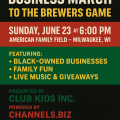 100 Black Business March to the Milwaukee Brewers Game
 Agent Nation Onboarding Guide, Powered by MCC. Built for Black Ownership.
Tina’s Nightclub AI Agent Example – Channels.biz
 Kevin Randolph, known as Beltline Kevin, (ATL)
 Red Lobster
 Auto Agent Network
 Law Agent Network
 Milwaukee AI Business Summit – June 2026
 Money Agent Network
 City-to-City: Best of the Best in Your City — Atlanta Georgia
 Virgo
My City Channels Black Market Milwaukee
 Jobs Agent Network
Elementor #20718
 Valentine Agent Network
Capricorn
Channels.biz Motorcycle Rally Agent Line Model
 Inventions Agent Network
 Steps to Setting Up Business Credit
 How to Get Paid With Social Media + AI (Using Everyday Life)
 Salt-N-Pepa
 CHANNELS AI Agent BUILDER
 Channels.biz, the Agent Network, and the Black Wealth Blueprint: Redefining the Digital Economy
 How to Build a Web3-Powered AI Agent That Earns, Learns, and Promotes
 Kelly Rowland
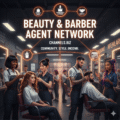 Beauty & Barber Agent Network
 How Channels.biz Can Build 10,000 Black Millionaires by 2027
 Places Categories – Channels.biz
Travel Agent Network
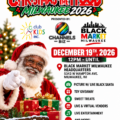 Christmas N’ Da Hood Toy Giveaway MKE (line/event)
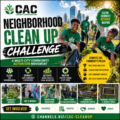 CAC Neighborhood Clean Up Challenge
 CAMPAIGN NAME:”Be the Face of Las Vegas – Limited Sponsorship Offer!”
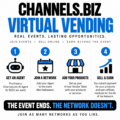 Virtual Vendor
 Entertainment Agent Network
Channels.biz Family Reunion Agent Line Model
 Marlon Wayans
 Date Planner
 Ride for Peace 2026 | Stop the Violence | Milwaukee
 In Living Color
 🐕🦺 Service Animals
 Hair Salons
 Teen Agent Network
 TechFest 26
 Motorcycle Channel — Agent Network on Channels.biz
 12 Days of Christmas in Las Vegas – Business Registration
 Shaq
 Family Agent Network
MyCityChannels Agent Network
 Chris Rock
 Restaurants
 DeliverIt App
 Food Agent Network
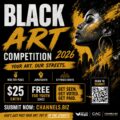 CAC Black Art Competition 2026
 Charles Barkley
 Angela Yee
 Education Agent Network
Test Channel (ADMIN)
 Nightclubs